
Navigation in VR
1. User Interface
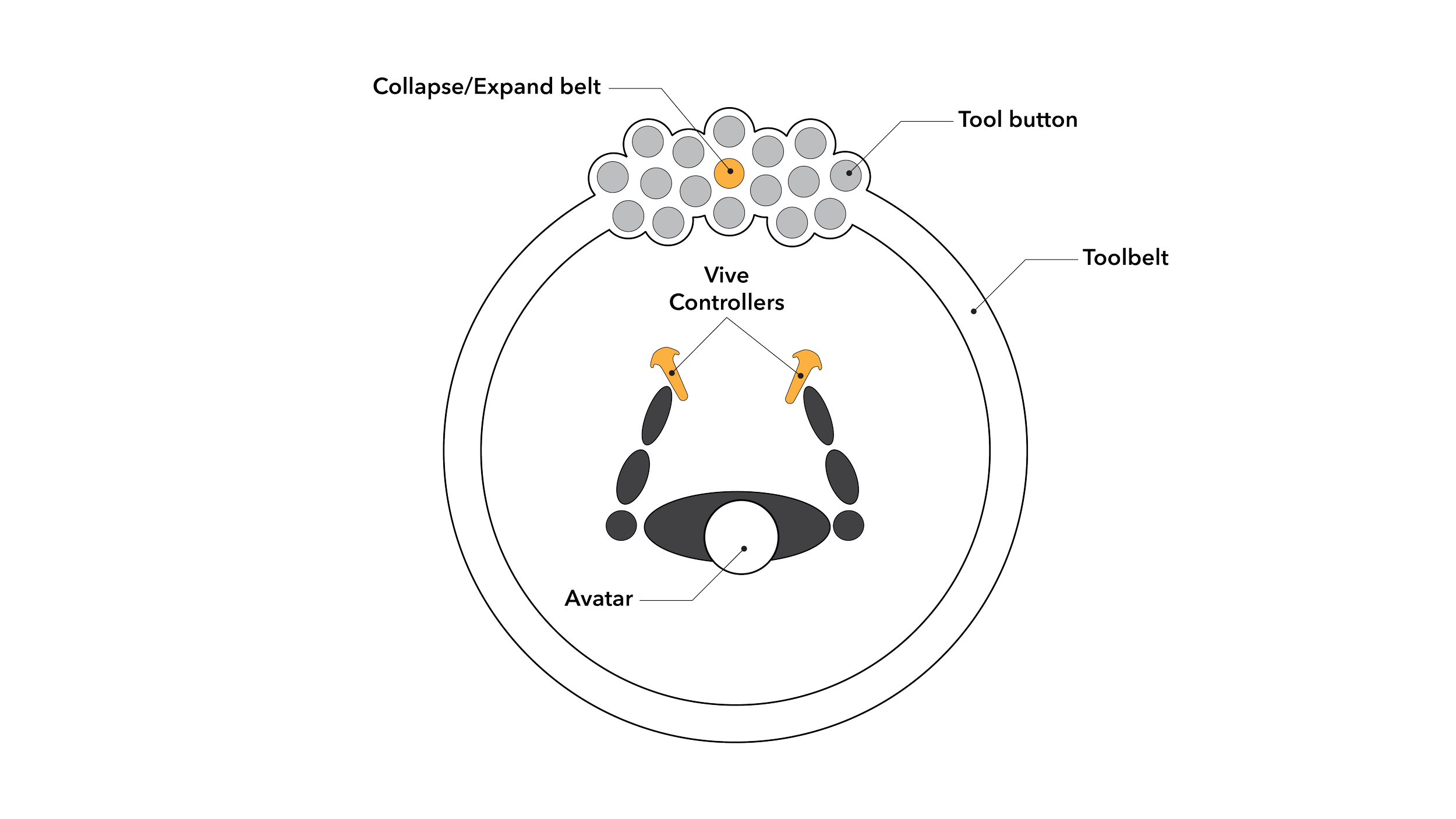
The main user interface for Toolbelt is a three-dimensional belt of tools around your waist that follows you through your VR experience. The trigger button on your controller is the main method of interacting with tools and objects in your space.
2. Controller Buttons
Interactions in VR use the Trigger, Grip, and Joystick buttons of your VR Headset Controllers. These buttons are standard on most VR hardware models, though they may take slightly different forms. For example on HTC Vive, the joystick is a thumbpad and on an Oculus Rift, the joystick is a traditional joystick.
Your controller will default to a teleportation tool. In order to select a new tool, look down in VR and point the controller at tool icons you see at your waist. Click the trigger button while pointing at a tool to activate a tool on your controller.
In order to move throughout your architectural space, you must select the teleport tool and then point your controller at the floor and click the trigger. Using the teleport button will transform your current headset position to the position you point at and click with the trigger.
3. OpenXR
Toolbelt uses the OpenXR framework, meaning that whatever Virtual Reality headset and controller setup you use on your desktop should be compatible with our software.
HTC Vive
Oculus Rift
Oculus Quest (Via Link Cable)
Valve Index
Windows Mixed Reality